作業環境: O.S.: Windows 8 IDE: Eclipse Luna
安裝環境: JDK:1.8 commons-logging:1.2 spring:4.1.6
commons-logging下載位置 http://commons.apache.org/proper/commons-logging/download_logging.cgi
spring下載位置 (spring-framework-4.1.6.RELEASE-dist.zip) http://repo.spring.io/release/org/springframework/spring/4.1.6.RELEASE/
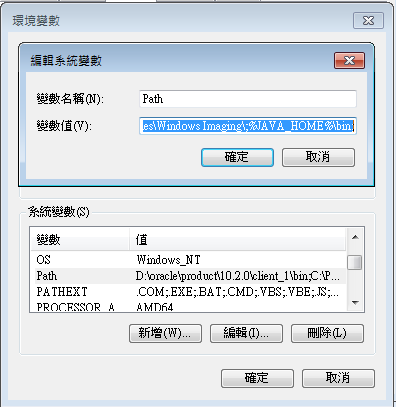
- 設定JDK1.8

-
開啟一個新的專案(HelloSpring)
-
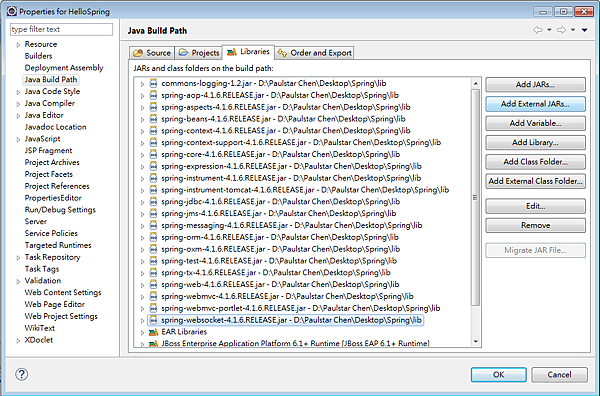
安裝lib (commons-logging & spring)
-
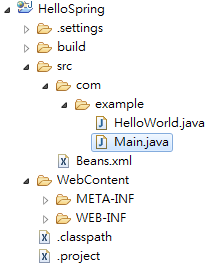
程式目錄 Beans.xml必需定義在src資料匣下
HelloWorld.java
package com.example ;

public class HelloWorld {
	private String message ;

	public void getMessage(){
	      System.out.println("Your Message : " + message);
	}
	public void setMessage(String message) {
		this.message = message;
	}
}
ClassPathXmlApplicationContext是由springn所提供的API,主要是用來讀取bean的設定檔,並且透過getBean()方法可得到該物件。
Main.java
package com.example ;

import org.springframework.context.ApplicationContext;
import org.springframework.context.support.ClassPathXmlApplicationContext;


public class Main {

	public static void main(String[] args) {
		ApplicationContext context =
	             new ClassPathXmlApplicationContext("Beans.xml");

	      HelloWorld obj = (HelloWorld) context.getBean("helloWorld");
	      obj.getMessage();
	}
}
指定class path並且透過給定unique id來操作物件,而不影響java程式。
Beans.xml

請先 登入 以發表留言。