- Aug 13 Sat 2016 14:28
-
Maven repository 概念

- Aug 07 Sun 2016 15:52
-
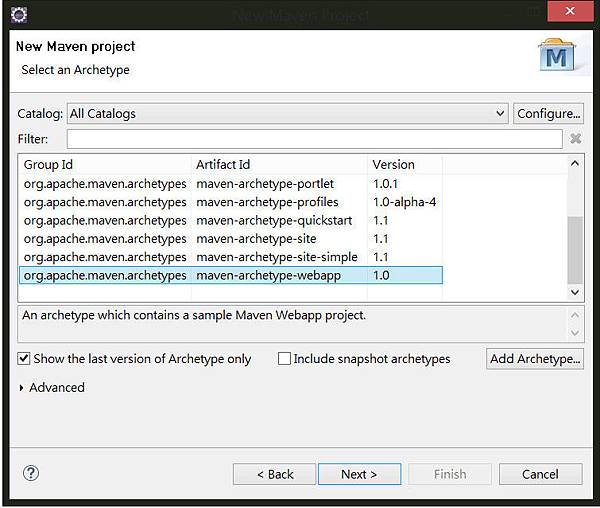
Eclipse內建立Maven project
- Jun 22 Mon 2015 17:02
-
Junit Annotation的應用

針對不同Annotation提供了一些說明
@BeforeClass :- Run only 1 time before all the test cases of class. Can be used to initialize resources.
@AfterClass :- Run only 1 time after all the test cases of class. Can be used to clean up the resources.
@Before :- Run annotated method every time individual test case is executed but run before the test case.
@After :- Run annotated method every time individual test case is executed but run after the test case
- Jun 22 Mon 2015 16:57
-
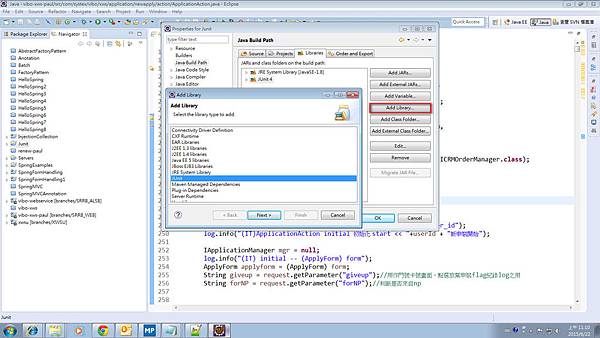
Junit 環境設定與安裝
- Jun 21 Sun 2015 22:07
-
Web Project with Spring
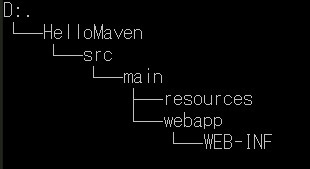
建立一個web專案archetypeArtifactId改為maven-archetype-webapp
mvn archetype:generate -DgroupId=com.example.Maven -DartifactId=HelloMaven -DarchetypeArtifactId=maven-archetype-webapp -DinteractiveMode=false
利用maven建立專案的樹狀圖如下:
利用maven package可以將專案打包成war檔
若想要加入spring framework可於pom.xml上做設定
- Jun 21 Sun 2015 11:16
-
Maven 環境設定與安裝

- Jun 18 Thu 2015 11:07
-
Sprng Form Handling

Spging mvc 可以針對簡單的form去處理(結合JSTL)。
web.xml
<display-name>Spring MVC Form Handling</display-name>
<session-config>
    <session-timeout>
- Jun 15 Mon 2015 10:22
-
Spring MVC
- Jun 15 Mon 2015 10:11
-
Annotation
Spting2.5後就可以使用Annotation的部分,在使用上面(較容易)可以取代原先XML的設定,但若是遇上Annotation和XML衝突的時候,則會以XML為主。
- Required (可使用在setter上)
Customer.java
- Jun 15 Mon 2015 09:56
-
Auto-wiring
Auto-wiring
config設定中autowire屬性可以依據當時的的狀況(no(預設)、byName、byType、constructor、autodetect)去自動綁定,而不需要去大量去撰寫的程式碼。
- byName
- Jun 14 Sun 2015 16:18
-
Injection Collection
注入除了一般型態外,也可針對Collection(List、Map、Set、Properties)進行注入。
Customer.java
package com.example ;
import java.util.List;
import java.util.Map;
- May 19 Tue 2015 17:02
-
Dependency Injection
一般物件與物件間會有所謂的相依性(dependency),例如教室相依於學生
package com.example;
public class Classroom {
	private Student stu=null ;
	public Classroom(){
